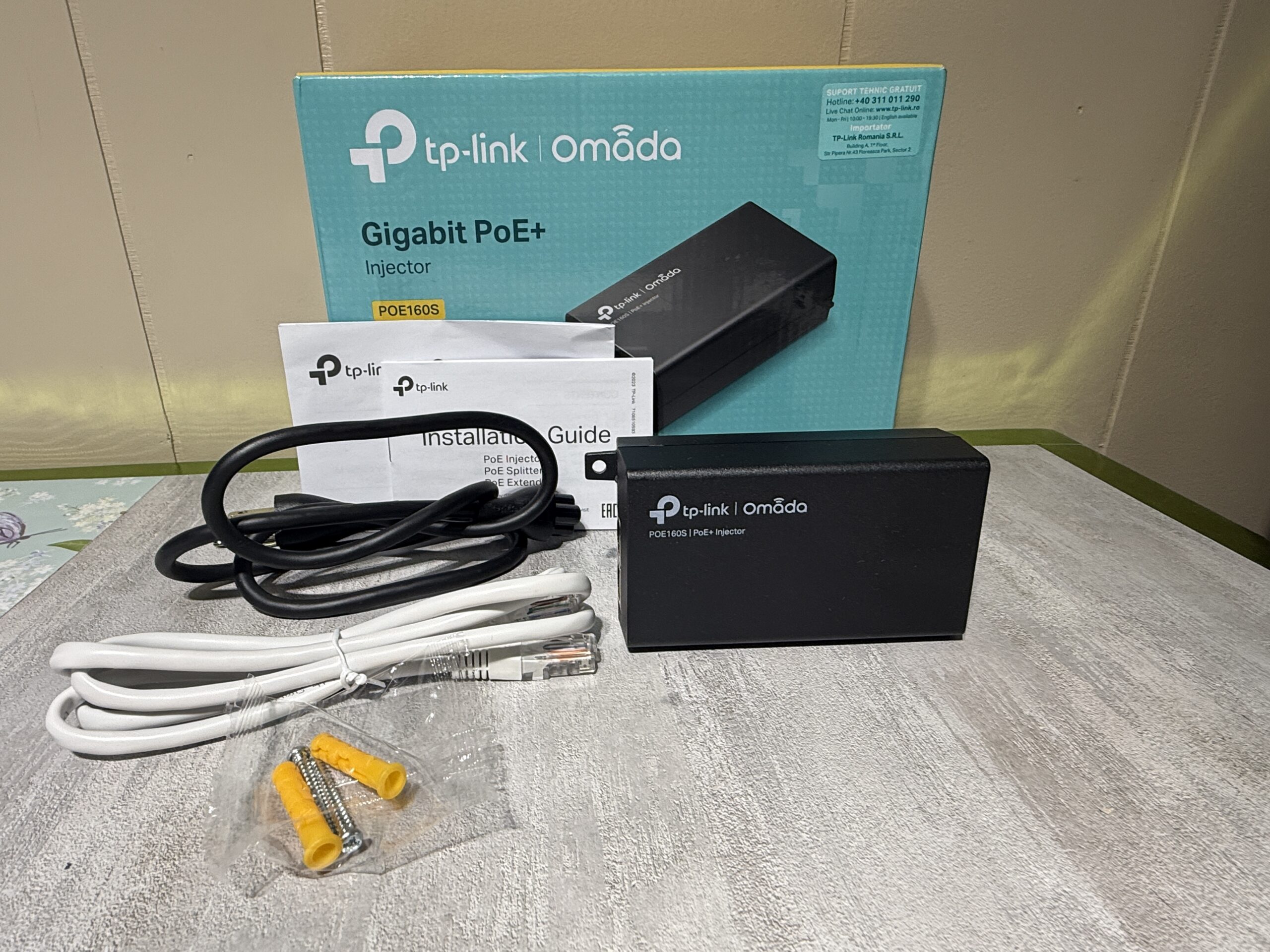
TP-Link Omada POE160S: A Simple Solution for Powering Your Network Devices
Looking for an easier way to power your network equipment without running a separate power connection to every device? The TP-Link Omada POE160S Gigabit PoE+ Injector offers a compact, practical solution for compatible security cameras, wireless access points, IP phones, and other network devices.
Whether you’re upgrading a home network, setting up a small office, or expanding a security system, this handy networking accessory can help simplify your installation.
What Is the TP-Link Omada POE160S?
The TP-Link Omada POE160S is a Power over Ethernet (PoE+) injector that combines electrical power and network data into a single Ethernet cable. It is designed for situations where a compatible network device needs both connectivity and power, but a PoE-enabled network switch isn’t available.
Instead of purchasing an entirely new network switch, you can use this injector to add PoE+ capability to a suitable Ethernet connection.
According to TP-Link’s official specifications, the POE160S supports Gigabit Ethernet and supplies up to 30 watts of PoE+ power. It complies with IEEE 802.3af/at standards. https://www.tp-link.com/us/business-networking/omada-accessory-poe-adapter/poe160s/v3/
5 Reasons to Consider the POE160S
1. Power and Data Through One Cable
One of the biggest advantages of Power over Ethernet is convenience. A single Ethernet cable can carry both network data and power from the injector to a compatible device.
This can help reduce cable clutter and make installations easier when positioning equipment in a location without a convenient power outlet.
2. Gigabit Ethernet Connectivity
The POE160S features two Gigabit Ethernet ports: a data input port and a PoE output port. Both support speeds of up to 1,000 Mbps, helping maintain fast network connectivity with compatible equipment. https://www.tp-link.com/us/business-networking/omada-accessory-poe-adapter/poe160s/v3/
3. Up to 30W of PoE+ Power
With up to 30W of output power, the POE160S supports a range of compatible PoE-powered devices.
Potential applications include:
- IP security cameras
- Wireless access points
- VoIP phones
- Other IEEE 802.3af/at-compatible networking equipment
Always check your device’s power requirements and PoE compatibility before connecting it.
4. Straightforward Installation
You don’t need to configure complicated software or manage another network device. The POE160S is designed for plug-and-play operation.
Its built-in power supply and automatic power detection help make setup straightforward for home users, small businesses, and networking enthusiasts.
5. Compact and Flexible Placement
The injector measures approximately 4.9 × 2.3 × 1.4 inches, making it small enough for many desktop networking setups. It also supports wall mounting, providing additional flexibility when organizing network equipment. https://www.tp-link.com/us/business-networking/omada-accessory-poe-adapter/poe160s/v3/
How Does a PoE Injector Work?
A PoE injector sits between your network connection and a compatible powered device.
The basic setup works like this:
- Connect your router, switch, or other Ethernet source to the injector’s Data In port.
- Connect the injector’s PoE Out port to your compatible powered device using an Ethernet cable.
- Connect the injector to an appropriate electrical outlet using its power cord.
- Check the device’s indicator and confirm that the connected equipment is receiving power and network connectivity.
The injector combines power and data on the output Ethernet connection, allowing the compatible device to receive both through one cable.
Who Can Benefit From the POE160S?
The POE160S may be a useful addition to several types of network installations.
Homeowners: Add a compatible PoE-powered wireless access point or security camera to your home network.
Small businesses: Power supported network equipment without replacing an existing Ethernet switch.
Security system installers: Simplify the connection of compatible PoE cameras where the installation calls for an individual injector.
IT professionals and networking enthusiasts: Keep a compact PoE+ injector available for installations, upgrades, and troubleshooting.
Remember that the injector provides power and data; it does not function as a router, wireless access point, or network switch.
What’s Included With This POE160S Kit?
The accompanying product photo shows the TP-Link Omada POE160S injector, its packaging, installation documentation, a power cord, an Ethernet cable, and wall-mounting hardware.
This makes the kit convenient for someone looking for the main injector and installation accessories together. Actual condition and completeness should be confirmed before purchase.
Important Compatibility Tips Before Buying
Before choosing a PoE injector, confirm these three details:
- PoE standard: Your device must support a compatible IEEE 802.3af or IEEE 802.3at PoE standard.
- Power requirements: The connected device must not require more power than the injector can provide.
- Network connection: Your connected equipment should support the Ethernet speed you need.
The POE160S provides up to 30W of output power. It should not be confused with higher-powered injectors designed for devices requiring 60W or 90W.
Final Thoughts
The TP-Link Omada POE160S is a practical networking accessory for anyone who needs to deliver power and Gigabit Ethernet data to a compatible device through a single cable.
Its compact design, plug-and-play installation, wall-mounting support, and up-to-30W PoE+ output make it a useful option for home networks, small businesses, and security installations.
If you’re looking for a straightforward way to add PoE+ power without replacing your existing network switch, the POE160S is worth considering.
Ready to simplify your network setup? Check the specifications of your equipment and see whether the TP-Link Omada POE160S is the right fit for your installation.

Related Articles
No user responded in this post
Leave A Reply
Please Note: Comment moderation maybe active so there is no need to resubmit your comments